
BUILD ANY LABEL YOU CAN DESCRIBE
Type what you need, like "a 4×2 inventory label with batch, variety, and a QR code", and GrowerIQ’s AI label builder turns it into a print-ready Zebra label template in seconds.
- Generate print-ready label templates in seconds with no design software and no coding
- Refine conversationally until every field, barcode, and date sits exactly right
- Print scannable QR labels that tie every jar, tag, and shipment back to its batch record
The Challenge
The problem: label design is a specialist bottleneck
Cannabis facilities print labels all day: plant tags, jar labels, sample labels, shipment labels. But designing them has always required desktop label software and someone who knows how to use it. So every new label request waits, and every workaround gets scribbled by hand.
- Only one person on the team knows the label design software, and they’re always busy
- Plant tags, lot labels, and shipment labels each need different layouts, sizes, and data
- A mistyped batch number or a missing packaged-on date becomes a compliance finding
- Changing one field on a layout means reopening design software and relearning the tool
- Reprinting hundreds of plant tags with manual layouts wastes hours and label stock
The Solution
How the AI Label Builder solves it
The AI Label Builder replaces desktop label-design software with a conversation. Describe the label, the AI designs it, and your whole team prints it with live data from your seed-to-sale records.
Describe
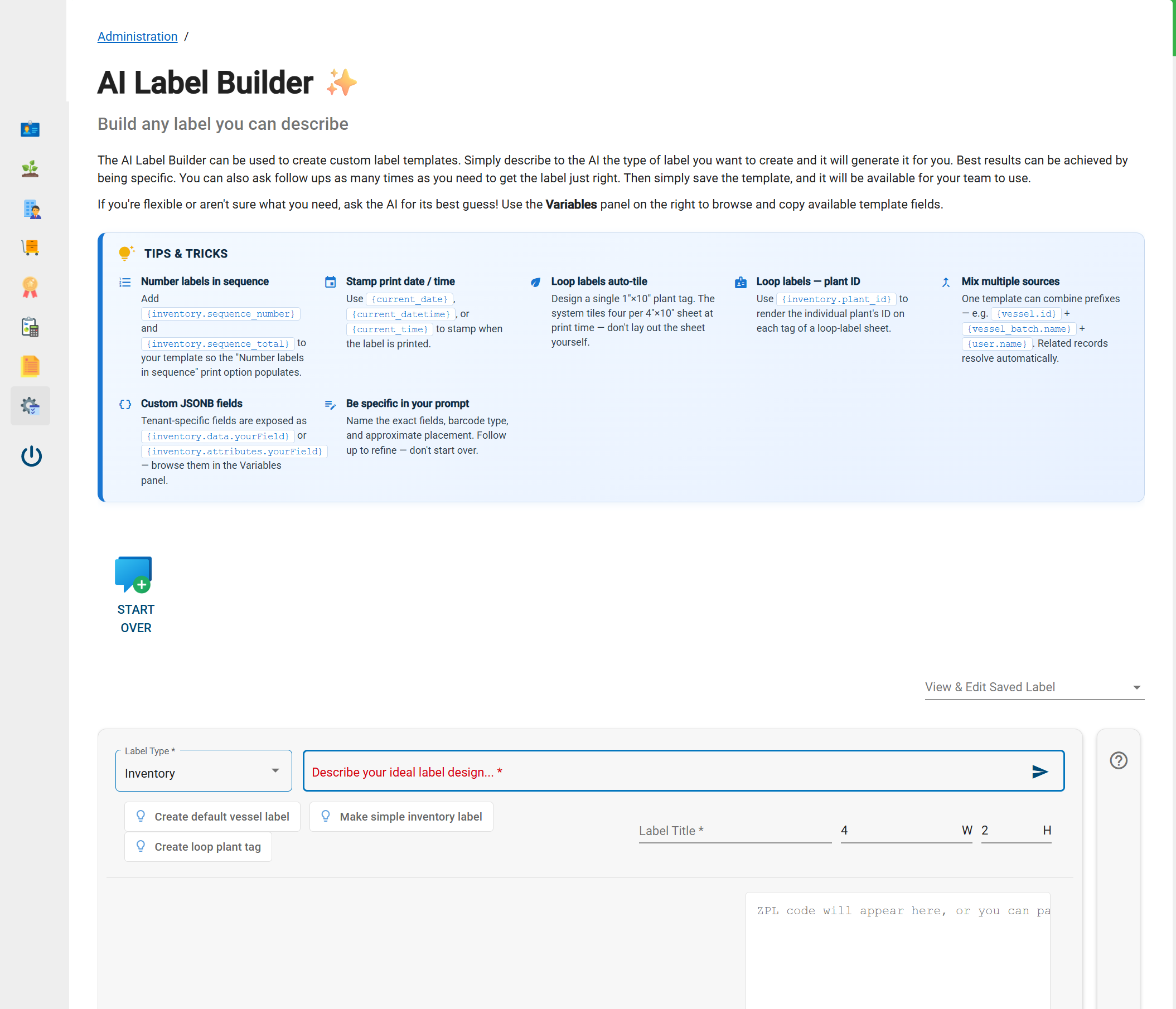
Tell the AI what you need in plain English: label type, size, fields, barcode. Quick-start templates cover vessel labels, inventory labels, and plant tags.
Refine
Watch the live preview and ask for changes conversationally, like "make the product name bigger" or "move the QR code right". The AI adjusts the design without starting over.
Save the template once and it appears in every Print Label dialog for your whole team, on web and mobile scanner, with live record data filled in automatically.
Process
How does the AI Label Builder work?
You choose a label type, describe the design in plain English, refine it against a live preview, and save it for your whole team to print. Four steps, no design software.
Choose a label type and size
Pick from 13 label types spanning cultivation, warehouse, QA, and sales, from 4×2 inventory labels to 1×10 plant tags, at any size from half an inch to twelve inches.
Describe your ideal label
Type a plain-English prompt naming the fields, barcode type, and rough placement you want. The AI generates the label design instantly.
Preview with real data
Browse the Variables panel, preview the label against a real record, and refine with follow-up prompts until it’s exactly right.
Save and print anywhere
Saved templates appear in every Print Label dialog across your organization, with quantity control, sequential numbering, and bulk printing by location.
Features
What can you build with the AI Label Builder?
Any label your facility prints, with live data, scannable barcodes, and automatic plant-tag tiling.
13 label types: Inventory, samples, vessels, plant tags, orders, shipments, received inventory, supplies, locations, destruction items, wholesale, and employee badges.
Live data variables: Every field on the record is available as a variable: batch, variety, weights, dates, location paths, and your organization’s custom fields.
Scanner-ready barcodes: QR and Code 128 barcodes encode a payload the GrowerIQ mobile scanner reads for instant record lookup. No typing IDs.
Plant-tag auto-tiling: Design one 1×10 loop tag and the system tiles four per sheet at print time, each with its own unique plant ID.
Sequential numbering: Number label runs 1-of-50 through 50-of-50 automatically, and stamp print date and time on every label.
Team template library: Save a label once and every teammate can print it from web or mobile scanner. Update, duplicate, or retire templates any time.
Use Cases
Who benefits from the AI Label Builder?
Everyone who touches a printed label: growers tagging plants, warehouse teams labelling lots and shipments, and QA teams proving traceability.
Cultivation Teams
Print batch-specific plant tags and vessel labels in bulk, with variety, stage, health, and plant IDs pulled straight from the batch record.
Warehouse & Operations
Label lots, received inventory, consumable supplies, and outbound shipments with weights, locations, and tracking data that’s always current.
Quality & Compliance
Standardize labelling across every room and shift, with batch and lot identifiers on every label and a scannable link back to the source record.
Compliance Built-In
Labels your auditors can trace
Every label the AI Label Builder prints pulls its data live from your seed-to-sale records, so the batch number on the jar always matches the batch number in the system. Scannable QR codes close the loop: print, scan, and see the full record history.
- Batch, lot, variety, and date data pulled straight from the source record with no retyping
- Wholesale and shipment labels can carry buyer licence numbers for B2B transfers
- Scannable QR codes tie every physical label back to its inventory record
- Organization-scoped templates keep labelling consistent across rooms, shifts, and sites
Ecosystem
Part of the GrowerIQ ecosystem
The AI Label Builder works seamlessly with other GrowerIQ modules:
Cultivation
Print plant tags and vessel labels straight from batch records, with live counts, stages, and plant IDs.
Learn more →Manufacturing
Label packaged lots, package runs, and finished goods with weights, dates, and lot identifiers.
Learn more →AI Form Builder
The same describe-it-and-go AI that builds your labels also builds custom forms for your SOPs.
Learn more →Results
Business impact
From label request to print-ready template. No design queue, no specialist software, no waiting on IT.
Variables fill in live record data at print time, so a single template serves your entire catalogue without edits.
Automatic plant-tag tiling cuts label stock waste and turns hundreds of unique plant tags into a few clicks.
FAQ
Frequently asked questions
No. You describe the label you want in plain English and the AI designs it, showing you a live preview as you go. There’s no desktop design software to install and no printer code to learn.
It generates industry-standard output for Zebra-compatible thermal label printers. Register your printer once under Equipment and it becomes available in every Print Label dialog, on web and mobile.
Any field from the record: product names, batch and lot numbers, varieties, weights, dates, storage locations, sequence numbers, and even your organization’s custom fields, plus QR and Code 128 barcodes.
Yes. Saved labels are shared across your organization automatically. Anyone can print them from a record’s Print Label button in the web app or the mobile scanner.
Yes. Design a single loop plant tag and the system tiles four per sheet at print time, each carrying its own unique plant ID, with the sheet count calculated for you.
Customer Reviews
Trusted by cannabis operators worldwide

Platform
Explore GrowerIQ Modules
The AI Label Builder integrates seamlessly with the full GrowerIQ platform. Labels pull live data straight from cultivation batches, manufacturing lots, quality workflows, and compliance records.

Cultivation
Software that conforms to your operations

Manufacturing
Produce the best quality products

QMS
Connect your QA team to the rest of your operations

CRM
Track Accounts, Orders, and Shipments in one place

GACP/EU GMP
Capture new markets through high-quality standards

Reporting & Data
Multi-facility and team reporting in one place
See the AI Label Builder in action
Ready to get correct, compliant labels on every item without becoming a label designer? Let us show you how GrowerIQ can help.